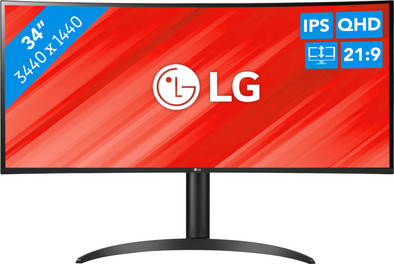
LG UltraWide 34WP85C
Never available again
View alternatives in the sidebar
Choose your monitor:
Enjoy sharper images op a larger screen
Choose your monitor
View alternatives in the sidebar
Choose your monitor:
Enjoy sharper images op a larger screen
Choose your monitor
According to our monitor expert
Sharpness | Quad HD (1440p) | |
Curved | ||
Aspect ratio | Ultrawide (21:9) | |
Refresh rate | 60 Hz | |
Response time | 5 ms | |
Panel type | IPS panel | |
Color depth | 1 billion colors (10-bit) | |
Built-in speakers |
5 stars
18
4 stars
15
3 stars
3
2 stars
0
1 star
0
Installation ease
Image quality
Price-quality ratio
Design
I was one of the lucky ones to test the LG 34WL85C-B 34 Inch UltraWide. In the beginning when the curved screens (the TVs in the first instance) came out, I really had my reservations about this. Why take a curved screen. This is now my first encounter with a curved screen, and I have to say that I was pleasantly surprised. Privately I had bought a 28” flat 4k screen from another brand, but I had the feeling that the corners of the screen were too far away from me. I didn't have that feeling at all with this LG screen.
Several cables are included in the box.
So it doesn't matter what connection you have on the computer/laptop, you can get started right away. There is a Displayport connection, USB-C connection and even 2 HDMI connections. The base feels very sturdy and it was very easy to assemble. What struck me is that you could slide the screen up and down, but you can't tilt it forwards and backwards with this screen. I have to say I didn't need this either.
I have used the screen for both business and private purposes in a few weeks, in this review I will only talk about private use.
I have a gaming laptop with both an HDMI and a USB-C (DP) connection. So I can connect this screen with 2 different cables. For business use you can even use Split Screen (Picture-By-Picture they call it), for gaming I prefer 1 wide screen. I must say, what a pleasure to have such a screen when playing a game. I mostly played GTA V. I really felt like I could see a lot more than with my other screen (28” 4K). Fluid movements and almost no shocking image. The speakers in the screen are pretty good, only when gaming is a headset still better.
The image is very bright, I had to set it to 50% so it wasn't too bright for me (I wasn't in a room where you had a lot of sunlight). You can therefore use this screen well in very bright environments. Beautiful colors and screen image. I never had any problems with my eyes, while I sometimes sat in front of the screen for up to 5 hours at a time.
If I had to choose between my 28” 4K screen or this LG, I would choose the LG. How well does such a curved screen work. All in all I am very positive.
Lars
10 November 2021
Automatically translated from Dutch
Nice sleek design. Good image quality. Easy to use and set up to personal preference.
Annet de Zwarte
5 February 2022
Automatically translated from Dutch
Fast and easy installation. Regarding the price quality ratio, this model was on top of the list.
Sina
4 August 2022
With Coolblue Extended Warranty, you are protected against costs due to quality defects of your monitor for the next 5 years. During the entire term, we will reimburse up to the original purchase price. You can easily add the Extended Warranty in your shopping cart.
€ 59,99
one-timeAdd your monitor to your shopping cart. In the next step, you can add the Extended Warranty. You can exchange or return your purchase for free within 30 days.
Product number | 893073 |
Manufacturer code | 34WP85CP-B.AEU |
Brand | LG |
Warranty | 2 years |
Processing of your defect | Carry-in warranty |
Recommended display resolution | 3440x1440 | |
Sharpness | Quad HD (1440p) | |
Aspect ratio | Ultrawide (21:9) | |
Refresh rate | 60 Hz | |
Response time | 5 ms | |
Panel type | IPS panel | |
Local dimming | ||
HDR support | ||
Contrast ratio | 1000 | |
Touchscreen | ||
Type of HDR | HDR10 | |
Screen reflection | Anti-glare | |
Blue light filter | ||
Flicker-free technology | ||
Color space | DCI-P3 | |
Color depth | 1 billion colors (10-bit) | |
Adaptive Sync | ||
Type of adaptive sync | FreeSync | |
Resolution width | 3440 pixels | |
Resolution height | 1440 pixels | |
Anti-reflection type | Anti glare | |
Viewing distance | 57 - 152 cm | |
Horizontal viewing angle | 178 ° |
Height | 57,1 cm | |
Width | 81,4 cm | |
Depth | 26 cm | |
Weight | 8,2 kg | |
Color | Black | |
Including stand | ||
Material | Plastic | |
Cable management | ||
Appearance | Business, Neutral | |
Curved | ||
Screen curve | 1800 R |
Number of HDMI connectors | 2 | |
Number of Female HDMI type A 2.0 ports | 2 | |
Number of headphone jacks | 1 | |
Type of headphone connection | 3.5mm (TS) | |
Number of Female Standard DisplayPort 1.4 ports | 1 | |
Number of female 3.5mm TS Audio Jack ports | 1 | |
Type of USB port | Standard USB-A, USB-C | |
Number of USB ports | 3 | |
Suitable for daisy chaining | ||
USB-C dock | ||
Maximum USB-C dock power | 96 W |
Included by default | DisplayPort cable, HDMI cable, USB-C cable |
Adjustable in height | ||
Tiltable | ||
Pivotable stand | ||
Pivot function | ||
VESA mount option | ||
VESA mount | 100x100mm |
Energy label | G | |
Energy consumption standby | 0,5 W | |
Energy consumption active | 42 W | |
Energy consumption per 1000h | 32 kWh | |
Annual energy consumption | 46,72 kWh | |
Annual energy costs | 18,69 euros |
Built-in speakers | ||
Sound system | Stereo | |
Webcam | ||
Split screen | ||
Kensington lock |
Recommended for use | Image editing and graphic design, Internet, email, and text processing, Office work, Photo editing, Watching movies in Full HD |

