Written by Rowan
Edited on
22 November 2024
·
14:08
How do you fix a Samsung dryer error yourself?
Your Samsung dryer is malfunctioning and shows an error code. For example, when the lint trap is clogged or the door doesn't close properly. Luckily, there's a possible solution for every Samsung dryer error. This means you don't have to call a technician right away. Here, you can read here what each error code means and what to do if your Samsung dryer is malfunctioning.
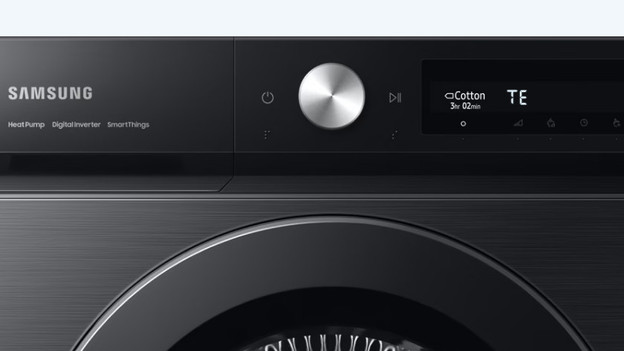
Samsung error tE, tE2, or tE4
The lint trap or condenser of your Samsung dryer may be clogged. Clean these as follows:
- Take out the lint trap and remove any large dust particles.
- Wipe the area where the lint trap is located with a dust cloth and gently rinse the dust sensor.
- Put the lint trap back in place.
- Clean the condenser rack with a vacuum brush.

Samsung error tE5
Error code tE5 means there's a problem with temperature sensor of the compressor. Turn off the dryer for 5 minutes and restart the cycle.

Samsung error dE or dF
Check the door when you see Samsung error dE or dF. There may be laundry caught in the door, which prevents it from closing properly. Load your dryer with care, close the door, and restart the cycle.

Samsung error HC or HE
The compressor that provides hot air may be overheated.
- Turn off the dryer for 20 minutes.
- Turn on the dryer and restart the cycle.
- No effect? Turn off the dryer again.
- Press the 2 buttons (depending on the model) 'time' and 'mixed laundry' at the same time, or 'dryness level' and 'mixed laundry'.
- Turn on the dryer.
- Let go of the buttons as soon as the DE notification appears or if all the lights are on.
- Switch the dryer off and on again.

Samsung error 2E
Perhaps the dryer isn't plugged in, or the socket doesn't supply power. To find out if there's electricity, test whether another product works on this socket. Another product doesn't work? You can be sure that electricity is the problem and that there's nothing wrong with the dryer.

Samsung error 3E
Error 3E means the motor isn't working. Switch off the dryer and restart the cycle.

Samsung error 5E
If you see the 5E error code, the condenser reservoir of your Samsung dryer is full. Empty the condenser reservoir, restart the dryer, and start the dryer cycle again. Is your dryer connected to the drain? The problem may be in the drain itself. Check whether there's a kink in the drain hose. You should also check if the drain isn't blocked. Contact the supplier if the error code doesn't disappear.

Error without a code
Do you have an old Samsung dryer without a display or with different buttons? Most likely, a combination of lights tells you what the problem is. Contact Samsung to solve the problem. They'll help you look for a solution.
Error 'empty reservoir' appears
When the light for the condenser reservoir comes on, the reservoir is full. Remove the reservoir from the dryer and empty it in the sink. When you put the reservoir back and start the dryer cycle, the notification should disappear. Is your dryer connected to the water drain and do you still see this error? Check the manual to learn how you can manually turn off the light. Also make sure there's no loop in the drain hose. The drain also shouldn't be higher up than 1m.

Problem not solved?
Unplug the plug from the socket and plug it back in after 30 minutes. Restart the dryer cycle. If your dryer still gives an error, a technician should look into it. One of the parts may be broken. Did you buy the dryer at Coolblue and is it covered by the warranty? Please contact our customer service. Is the dryer out of warranty or did you buy it elsewhere? Please contact Samsung to solve the problem.
Article by Rowan
Dryer Expert.