Written by Bob
Edited on
23 December 2023
·
13:55
Compare the MyPOS Go 2 to the Go 2 Combo and Pro
With a MyPOS portable card reader, you can have customers pay with their debit card or smartphone anywhere. With the MyPOS 2 Combo and Pro, you can also print receipts right away. In addition, the Pro has a large touchscreen and useful apps. We'll explain what these differences mean and what you can use the models for.
View the MyPOS Go 2, Go 2 Combo, and Pro
- MyPOS Go 2
Accept payments via debit cards and smartphones
Always stay connected to the internet via 4G
You can't print receipts
The Go 2 has a small screen and control via buttons
From
€ 95,-
- MyPOS Go 2 Combo
Accept payments via debit cards and smartphones
Always stay connected to the internet via 4G
Print receipts right away
The Go 2 has a small screen and control via buttons
From
€ 206,99
- MyPOS Pro
Accept payments via debit cards and smartphones
Always stay connected to the internet via 4G
Print receipts right away
Control the Pro via the large touchscreen
From
€ 299,-


Comparison of the MyPOS Go 2, Go 2 Combo, and Pro
| MyPOS Go 2 | MyPOS Go 2 Combo | MyPOS Pro | |
|---|---|---|---|
| Built-in SIM card | Yes | Yes | Yes |
| Control via | Buttons | Buttons | Touchscreen |
| Print receipts | No | Yes | Yes |
| Battery life | 1 day | 2 ddays | 1 day |
| Download apps | No | No | Yes |
Hardware and design

Go 2: compact
The MyPOS Go 2 is the most compact card reader. It's slightly smaller and a bit thicker than most smartphones. You can easily take it with you in your bag or pocket. You can't print receipts, so you have to send those via text or email. You can control the Go 2 with the buttons.

Go 2 Combo: with printer
The MyPOS Go 2 Combo consists of a Go 2 with a printer. With this printer, you can give your customers a receipt right away. The printer is also a docking station. You can attach your MyPOS Go 2 magnetically to charge your battery. You can use your Go 2 double the amount of time as a result, which is 2 days. Don't need the printer or extra battery life? Easily detach your Go 2, which leaves you with a compact card reader.

Pro: with printer and touchscreen
The design of the MyPOS Pro differs from the MyPOS Go 2 and looks like a smartphone. You can control the MyPOS Pro quickly and easily via the large touchscreen. On this screen, you can also see more transactions details than on the small screen of the MyPOS Go. With the built-in printer, you can give all your customers a receipt right away
Software
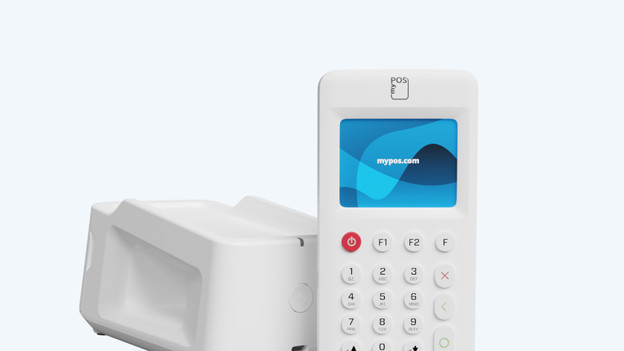
Go 2 (Combo): all of the basic functions
With the MyPOS Go 2 and Go 2 Combo, you can have customers pay with their debit card, credit card, or smartphone. You don't need your smartphone or tablet for this, because all MyPOS card readers have a built-in SIM card. Via the installed software, you can quickly send receipts via email or text. In addition, you can give customers the option to add a tip. Afterwards, you can view all the transaction details via the MyPOS app on your smartphone or via the website.
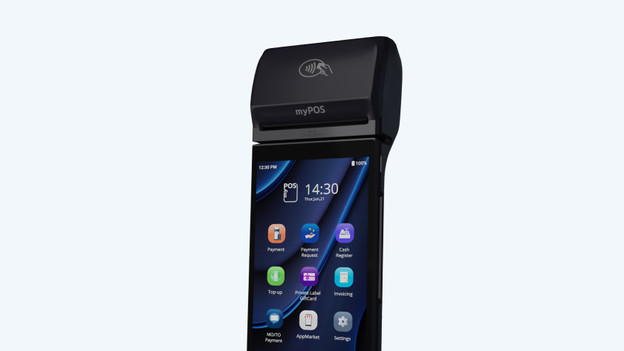
Pro: app downloads and QR codes
The MyPOS Pro has all of the functions the MyPOS Go 2 has, and some extras. In terms of controls. the MyPOS Pro looks like a smartphone. This allows you to download useful apps via the MyPOS App Market. For example, an app to track your taxi trips. Or an app that makes it easier to use your MyPOS Pro in the hospitality industry. In addition, you can show QR codes on the touchscreen. This way, you give customers another payment option.
Article by Bob
Portable Card Reader Expert.